User Statistics Report
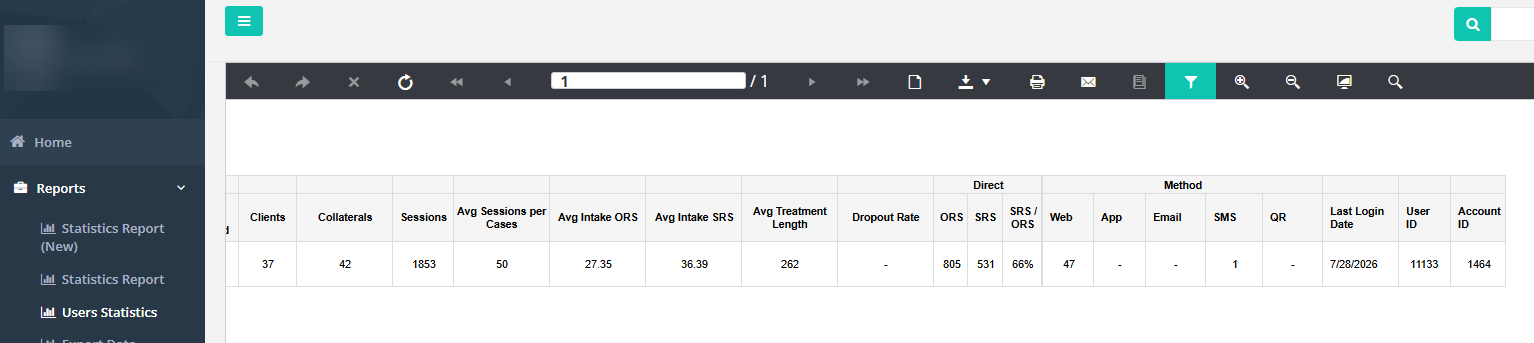
OpenFIT has a prebuilt report available to track things like practitioner tool administration and last login . You can filter the report data several ways in the database. One of those ways is by active and inactive cases.
Many reports have both filters and a drill down feature that contains more granular detail. Reports can be downloaded and OpenFIT can also configure back door access to the OpenFIT database through a PowerBI/API interface.
As an agency sets up the database and pilots FIT, the user statistics report is an excellent resource. At later stages of implementation, the user statistics report continues to be a resource for tracking fidelity of your implementation efforts.

Using the User Statistics Report at the FIT Installation and Implementation Stages

User Report at the Initial Installation Stage
User Stats report can answer these questions:
Are pilot implementation users accessing the OpenFIT system and is data getting entered by pilot users?
I. Who is logging in? (column 21)
2. Who hasn't activated their account & might need a fresh activation link? (column 5)
3. Who is activated but not using system (columns 5 & 21)
4. Are supervisors using system? (columns 1, 5, & 21)
5. Are there Cases and Clients? Sessions? Surveys? (columns 7, 11, 13, &19)
6. Depending on your organization, do you expect collaterals using the system? (column 12)
7. Who seems to be an early engager with a number of cases entered in OpenFIT? These will become your FIT champions.
8. What good learning is there in this report for the next stage?
User Statistics Report at the Initial Implementation
Continue asking the questions from the pilot stage and additional stages
1. Are cases getting closed as needed? (column 9 & 10) (cases need to be closed for accurate dropout statistics)
2. Who is actively logging in, creating new cases, sharing surveys? (columns 7, 11, 13, &19)
3. Are supervisors directly logging into the system themselves?
4. Are user accounts getting closed who should no longer have access? (columns 6)
5. As you expand beyond your pilot, is more data getting entered by more staff?
6. Are you continuing to maintain and/or improve utilisation compared to the pilot?
7. Check if FIT is being offered as expected (administration of both tools ORS and SRS - column 19)
Direct vs Shared Cases
Direct: A survey counts as Direct when the user who administered it is the case's current owner — i.e. the person who logged in and recorded the survey is the same user the case is currently assigned to.
Shared: Everything else — any survey administered by a user who is not the case's current owner. This is common when a case is shared across a team and a clinician other than the owner records a session, or when ownership has been reassigned after earlier surveys were taken.
Method (Web / App / Email / SMS / QR)
Direct vs Shared
Direct: A survey counts as Direct when the user who administered it is the case's current owner — the person who logged in and recorded the survey is the same user the case is currently assigned to.
Shared: Everything else — any survey administered by a user who is not the case's current owner (for example, another clinician on a shared case, or surveys taken before ownership was reassigned).
Direct/Shared is about who administered the survey, not how it was delivered.
Method (Web / App / Email / SMS / QR)
The Method columns show how each follow-up survey was completed — the channel it came through. This is independent of Direct/Shared:
- Web — completed in the OpenFIT web app by a logged-in user.
- App — completed in the OpenFIT mobile app.
- Email — completed by the client via an emailed survey link.
- SMS — completed by the client via a texted survey link.
- QR — completed by the client by scanning a QR code.
These columns count the follow-up (repeat) surveys included in the report, so their total is a channel breakdown of that activity rather than every survey ever taken.
Was this article helpful?
That’s Great!
Thank you for your feedback
Sorry! We couldn't be helpful
Thank you for your feedback
Feedback sent
We appreciate your effort and will try to fix the article